(Published in 2011)
Abstract
A user interface to create, read, update or delete records (CRUD) is an essential component of any computer system. The existing user interfaces and activities in record management can be further optimized. Some existing CRUD interfaces involve migrating to a few different pages with a different set of controls and different functionalities. This proposed model is developed to achieve all the functions related to record management on the same page with the same set of controls. This model can achieve all the CRUD functionality in a single page with the same set of controls using minimal interactions. This model ensures a higher level of user-friendliness with more efficient resource management. The proposed model can be extended easily to accommodate specific requirements in different situations.
Introduction
Several entities need to have CRUD functionality even in a simple software solution. The users may view records through the user interface. They may update the viewed record or delete that. The users also need to create new records. This functionality is currently achieved by different systems using a combination of pages. Each page involved has different components with different actions on each page. These systems could have been improved to achieve the same functionality in a simpler and more user-friendly manner. This article discusses a simple, yet powerful model to manage records which have a more user-friendly UI and lesser interactions to achieve the same CRUD operations. This proposed model can achieve all CRUD functions in a single page with the same set of control with minimal interactions.
Existing Modals for Record Management
When users manage records, they have to perform actions like adding a new record, viewing an existing record, altering and updating a selected record or deleting one. In order to achieve that functionality, some systems needed to navigate to a few different pages with a different set of controls on each page.
Some systems provide links like Add New, Search, Edit, Previous and Next, to achieve CRUD functionality. The users have to navigate to different page views at different stages of activities of CRUD functions. The controls appear on one page may be different from another; hence the users have to adapt to different situations depending on the action he is undertaking. Even very popular applications have suboptimal CRUD interfaces. The first examples given here is CRUD functionality is OpenMRS, which is a popular Open Source Electronic Medical Record System. The other example is automatically generated JSF page Cby NetBeans for CRUD operations for Entity Classes.
Open MRS has one page to view a Record, Figure 1. It has several links like "Previous", "Edit", "Next", "New" and "Search". The page to Edit a Record, Figure 2, is different from the page to view a Record. It has links like "Save" and "Delete" at the bottom of the page. There is another page to create a Record, Figure 3, which is different from previous pages. It has a link "Save", but some links in other pages like "Search" are missing. This example is clear evidence that there are several different pages involved in CRUD operations. Each different page has a different combination of controls. The placement of controls also differs among the pages.

Figure 1: Open MRS interface for viewing a record

Figure 2: OpenMRS interface for Updating a Record

Figure 3: OpenMRS interface for Creating a Record

Figure 4: View during creating a new item

Figure 5: Soon after saving the newly created item

Figure 6: Listing all Items

Figure 7: View after Preparing to Edit a record

Figure 8: View soon after saving changes to an existing record
The modal I developed have following characters.
• Same User Interface for all record management functions.
• Ability to directly navigate to all possible sequence of actions that involves record management.
• Minimizing accidental mismanagement of records
• Simple, user friendly arrangement of the user interface
• Ability to extend the functionality depending on specific requirements.
I have attached two demonstrations of the modal, one using Visual Basic 6, which I used for 8 years now and the other using Java Server Faces, which I finished few days back.
There is a list of the records on the left side of the page. On top of that list, there is a text box to search the records. Immediately below the list, there are three buttons, named here as Add, Edit and Delete. On the right side of the page, the details of the selected record are displayed. Immediately below the details, there are two buttons, namely Save and Cancel. In windows MDI forms, I include a Close button on the right lower most corner as well.
There is two states in my modal, select mode and modify mode. During the select mode the search text box, list box and buttons on the left side are active. The details and buttons on the right are visible, but not active in this select mode. In the modify mode, the details and buttons on the right are active while the others are inactive.
When the window opened or web page requested, the select mode is active. In this state, a text can be entered in the search text box. The list can be clicked and immediately the details of the selected record will be displayed on the right side. If Add button is clicked, all the details are cleared on the right side and page is shifted to modify mode. In this modify mode, no search text can be entered to search box and the list is inactive. After adding the details for a new record, the user has two choices, either to Save the changes or to discard them clicking Save button or the Cancel button respectively. This will bring back the Select mode. In select mode, after selecting a record, Edit button can be clicked and the controls already displaying the details of the record will become editable. After making changes, Save button or Cancel button can be selected as needed.
The Delete button is active only during the Select mode. After selecting the record, which will also display the details of the record immediately, user can click the Delete button to delete it.
Every functionality involved in record management can be achieved in the very same window or the page. The buttons in all situations remain the same place, and the user is not needed to adjust to different views of different states.
This basic functionality can be adjusted to meet different requirements without major modifications. The search box here searches one field of the records, and several search boxes in a tabbed pane can be added to search multiple fields. The list box may contain only one field, like for example, name of grocery items, but can use a table with the name and the price, instead of a list box. At the onset, the listbox can be populated with all the items or it can be populated depending on the search text. If all the items are listed, as the user continue to enter letters to the search box, the most suitable selection can bring to the top of the list or can just remove all the non matching ones from the list. As the search text is expanded, the best possible list may be selected from the list below and its details are displayed on the right side. When that is not suitable in some situations, the selection of a record in the list can be delayed until the exact match is achieved, so the details are not displayed until then. The user can stop entering the remaining search text and directly click on the list below to select and display the record.
The Add, Edit and Delete buttons can be remained active throughout the select mode or it they can be selectively make active or inactive depending on the requirement. Add button can be made inactive if a record is already selected in the list. Edit and Delete buttons can be inactive till an exact selection is made in the list.
If there is need to Edit multiple records simultaneously, select many type of a list box can be used. When multiple selections are made, only the common values of all the selected records will be displayed. Depending on the requirements, the values of all the records can be updated with a single click on Save button.
If users request even lesser clicking of buttons, Edit buttons, Save button and Cancel button can be omitted. In that case, when ever selection is made, the controls displayed on the right will be editable and whatever the changes made will be save when selecting another one or closing the page or the window.

Figure 9: VB6 Demo - Select Mode, before selecting any item

Figure 10: VB6 Demo - Select Mode, after selecting item

Figure 11: VB6 Demo - Modify mode, after selecting one and clicking Edit Button

Figure 12: VB6 Demo - Modify mode, after clicking Add Button
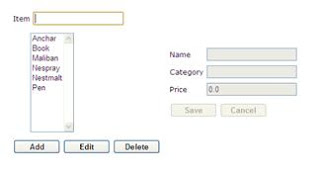
Figure 13: JSF Demo - Select mode, before entering any search text

Figure 14: JSF Demo - Select mode, after entering some search text

Figure 15: JSF Demo - Modify mode after clicking on Edit button

Figure 16: JSF Demo - Modify mode after clicking Add button
First demo, which was developed using VB6, can be downloaded from the link as an installation shield setup in a zip folder. The JSF demo, is available in my local computer with a 512mbits/sec ADSL connection with a dynamic IP, is configured to be accessed through dynamic to static IP site, pagekite.me. In that demo, I have used Ajax and whole process is asynchronous.
I did not intend to take any copyrights or patenting and I will be grateful to you if you can give me a feedback.
Implementation of the modal is very simple, and if anyone is interested, I can help or give the source code for the demos.
Latest Updated Article
Blog Article
Contact Details
Name: Dr M. H. B. Ariyaratne, MBBS (Sri Lanka), Postgraduate Trainee for MSc (Biomedical Informatics)
Email : buddhika.ari@gmail.com, buddhika_ari@yahoo.com
Phone : (+94) 71 58 12399, (+94) 91 22 41603
Skype : buddhika.ari
Abstract
A user interface to create, read, update or delete records (CRUD) is an essential component of any computer system. The existing user interfaces and activities in record management can be further optimized. Some existing CRUD interfaces involve migrating to a few different pages with a different set of controls and different functionalities. This proposed model is developed to achieve all the functions related to record management on the same page with the same set of controls. This model can achieve all the CRUD functionality in a single page with the same set of controls using minimal interactions. This model ensures a higher level of user-friendliness with more efficient resource management. The proposed model can be extended easily to accommodate specific requirements in different situations.
Introduction
Several entities need to have CRUD functionality even in a simple software solution. The users may view records through the user interface. They may update the viewed record or delete that. The users also need to create new records. This functionality is currently achieved by different systems using a combination of pages. Each page involved has different components with different actions on each page. These systems could have been improved to achieve the same functionality in a simpler and more user-friendly manner. This article discusses a simple, yet powerful model to manage records which have a more user-friendly UI and lesser interactions to achieve the same CRUD operations. This proposed model can achieve all CRUD functions in a single page with the same set of control with minimal interactions.
Existing Modals for Record Management
When users manage records, they have to perform actions like adding a new record, viewing an existing record, altering and updating a selected record or deleting one. In order to achieve that functionality, some systems needed to navigate to a few different pages with a different set of controls on each page.
Some systems provide links like Add New, Search, Edit, Previous and Next, to achieve CRUD functionality. The users have to navigate to different page views at different stages of activities of CRUD functions. The controls appear on one page may be different from another; hence the users have to adapt to different situations depending on the action he is undertaking. Even very popular applications have suboptimal CRUD interfaces. The first examples given here is CRUD functionality is OpenMRS, which is a popular Open Source Electronic Medical Record System. The other example is automatically generated JSF page Cby NetBeans for CRUD operations for Entity Classes.
Open MRS has one page to view a Record, Figure 1. It has several links like "Previous", "Edit", "Next", "New" and "Search". The page to Edit a Record, Figure 2, is different from the page to view a Record. It has links like "Save" and "Delete" at the bottom of the page. There is another page to create a Record, Figure 3, which is different from previous pages. It has a link "Save", but some links in other pages like "Search" are missing. This example is clear evidence that there are several different pages involved in CRUD operations. Each different page has a different combination of controls. The placement of controls also differs among the pages.

Figure 1: Open MRS interface for viewing a record

Figure 2: OpenMRS interface for Updating a Record

Figure 3: OpenMRS interface for Creating a Record

Figure 4: View during creating a new item

Figure 5: Soon after saving the newly created item

Figure 6: Listing all Items

Figure 7: View after Preparing to Edit a record

Figure 8: View soon after saving changes to an existing record
The modal I developed have following characters.
• Same User Interface for all record management functions.
• Ability to directly navigate to all possible sequence of actions that involves record management.
• Minimizing accidental mismanagement of records
• Simple, user friendly arrangement of the user interface
• Ability to extend the functionality depending on specific requirements.
I have attached two demonstrations of the modal, one using Visual Basic 6, which I used for 8 years now and the other using Java Server Faces, which I finished few days back.
There is a list of the records on the left side of the page. On top of that list, there is a text box to search the records. Immediately below the list, there are three buttons, named here as Add, Edit and Delete. On the right side of the page, the details of the selected record are displayed. Immediately below the details, there are two buttons, namely Save and Cancel. In windows MDI forms, I include a Close button on the right lower most corner as well.
There is two states in my modal, select mode and modify mode. During the select mode the search text box, list box and buttons on the left side are active. The details and buttons on the right are visible, but not active in this select mode. In the modify mode, the details and buttons on the right are active while the others are inactive.
When the window opened or web page requested, the select mode is active. In this state, a text can be entered in the search text box. The list can be clicked and immediately the details of the selected record will be displayed on the right side. If Add button is clicked, all the details are cleared on the right side and page is shifted to modify mode. In this modify mode, no search text can be entered to search box and the list is inactive. After adding the details for a new record, the user has two choices, either to Save the changes or to discard them clicking Save button or the Cancel button respectively. This will bring back the Select mode. In select mode, after selecting a record, Edit button can be clicked and the controls already displaying the details of the record will become editable. After making changes, Save button or Cancel button can be selected as needed.
The Delete button is active only during the Select mode. After selecting the record, which will also display the details of the record immediately, user can click the Delete button to delete it.
Every functionality involved in record management can be achieved in the very same window or the page. The buttons in all situations remain the same place, and the user is not needed to adjust to different views of different states.
This basic functionality can be adjusted to meet different requirements without major modifications. The search box here searches one field of the records, and several search boxes in a tabbed pane can be added to search multiple fields. The list box may contain only one field, like for example, name of grocery items, but can use a table with the name and the price, instead of a list box. At the onset, the listbox can be populated with all the items or it can be populated depending on the search text. If all the items are listed, as the user continue to enter letters to the search box, the most suitable selection can bring to the top of the list or can just remove all the non matching ones from the list. As the search text is expanded, the best possible list may be selected from the list below and its details are displayed on the right side. When that is not suitable in some situations, the selection of a record in the list can be delayed until the exact match is achieved, so the details are not displayed until then. The user can stop entering the remaining search text and directly click on the list below to select and display the record.
The Add, Edit and Delete buttons can be remained active throughout the select mode or it they can be selectively make active or inactive depending on the requirement. Add button can be made inactive if a record is already selected in the list. Edit and Delete buttons can be inactive till an exact selection is made in the list.
If there is need to Edit multiple records simultaneously, select many type of a list box can be used. When multiple selections are made, only the common values of all the selected records will be displayed. Depending on the requirements, the values of all the records can be updated with a single click on Save button.
If users request even lesser clicking of buttons, Edit buttons, Save button and Cancel button can be omitted. In that case, when ever selection is made, the controls displayed on the right will be editable and whatever the changes made will be save when selecting another one or closing the page or the window.

Figure 9: VB6 Demo - Select Mode, before selecting any item

Figure 10: VB6 Demo - Select Mode, after selecting item

Figure 11: VB6 Demo - Modify mode, after selecting one and clicking Edit Button

Figure 12: VB6 Demo - Modify mode, after clicking Add Button

Figure 13: JSF Demo - Select mode, before entering any search text

Figure 14: JSF Demo - Select mode, after entering some search text

Figure 15: JSF Demo - Modify mode after clicking on Edit button

Figure 16: JSF Demo - Modify mode after clicking Add button
First demo, which was developed using VB6, can be downloaded from the link as an installation shield setup in a zip folder. The JSF demo, is available in my local computer with a 512mbits/sec ADSL connection with a dynamic IP, is configured to be accessed through dynamic to static IP site, pagekite.me. In that demo, I have used Ajax and whole process is asynchronous.
I did not intend to take any copyrights or patenting and I will be grateful to you if you can give me a feedback.
Implementation of the modal is very simple, and if anyone is interested, I can help or give the source code for the demos.
Latest Updated Article
Blog Article
Contact Details
Name: Dr M. H. B. Ariyaratne, MBBS (Sri Lanka), Postgraduate Trainee for MSc (Biomedical Informatics)
Email : buddhika.ari@gmail.com, buddhika_ari@yahoo.com
Phone : (+94) 71 58 12399, (+94) 91 22 41603
Skype : buddhika.ari


